AGENTS.md vs CLAUDE.md: One Agent-Agnostic Setup for Claude Code, Codex, Cursor and Copilot
One AGENTS.md and one skills folder for Claude Code, Codex and Cursor: the symlinks, the CLAUDE.md import and the prompt I used to migrate 22 repos.
I put a lot of work into making my repos easy for coding agents. Rules, git conventions, architecture notes, docs rules, a code review checklist, skills. A whole prompt ecosystem.
I started with Copilot, then moved to Cursor. Every move meant setting up the same rules and skills again. Then I moved from Cursor to Claude Code. Right after that, my team got access to Codex, and I liked it more. The same ecosystem needed a second migration, right after the first one. So this time I set up my 22 repos once, in a way any agent can read. The final migration took less than an hour.
This article gives you the exact setup: the file layout, the one-line CLAUDE.md, the symlinks, the migration prompt, and a 2-minute test. I tested all of it on my machine with Claude Code, Codex and the Cursor CLI. And one part of your setup will not move between agents at all. I will show you which one at the end.
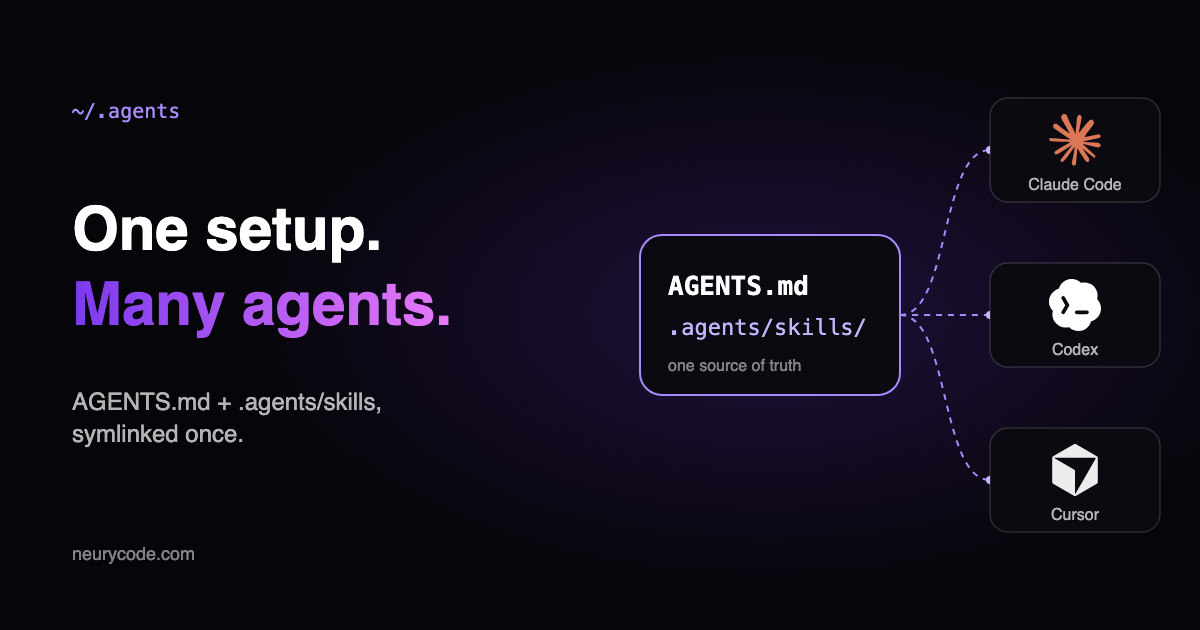 One setup, many agents: AGENTS.md and .agents/skills feed Claude Code, Codex and Cursor
Why your prompt ecosystem breaks every time you switch tools
The model is not the valuable part of your setup. The valuable part is what you taught it about your work.
Take my code review checklist. Every repo has one. It tells the agent what matters in this repo, how deploy works, what runs on CI/CD and how the version number is made. It also lists the mistakes developers often make in this exact repo. Without it, agents miss important things. With it, a review catches what a new teammate would miss.
Now multiply that by rules, conventions and skills across 22 repos. Then try to move it to a new tool.
The problem is that every tool looks for these files in its own place:
| Main instructions | Skills (repo) | Skills (user) | |
|---|---|---|---|
| Claude Code | CLAUDE.md (reads AGENTS.md only if there is no CLAUDE.md) | .claude/skills/ | ~/.claude/skills/ |
| Codex | AGENTS.md | .agents/skills/ | ~/.agents/skills/ |
| Cursor | AGENTS.md, .cursor/rules/*.mdc | .agents/skills/, .cursor/skills/ | ~/.agents/skills/, ~/.cursor/skills/ |
Sources: Claude Code skills, Codex skills, Cursor skills.
I tried two easy fixes before. First, I copied files between tool folders. Then I used the npx skills installer. Both worked, but only until the next migration.
Copies also drift. In one of my repos, CLAUDE.md and AGENTS.md started as copies of each other. When I checked them, they were already different. Nobody noticed.
This matters even more in a team. Different people use different tools. One shared setup means nobody has to translate rules for their own agent.
The setup in one picture
The idea is simple. Keep one canon in git: AGENTS.md for instructions and .agents/skills/ for skills. Every tool reads the canon, either directly or through a tiny bridge.
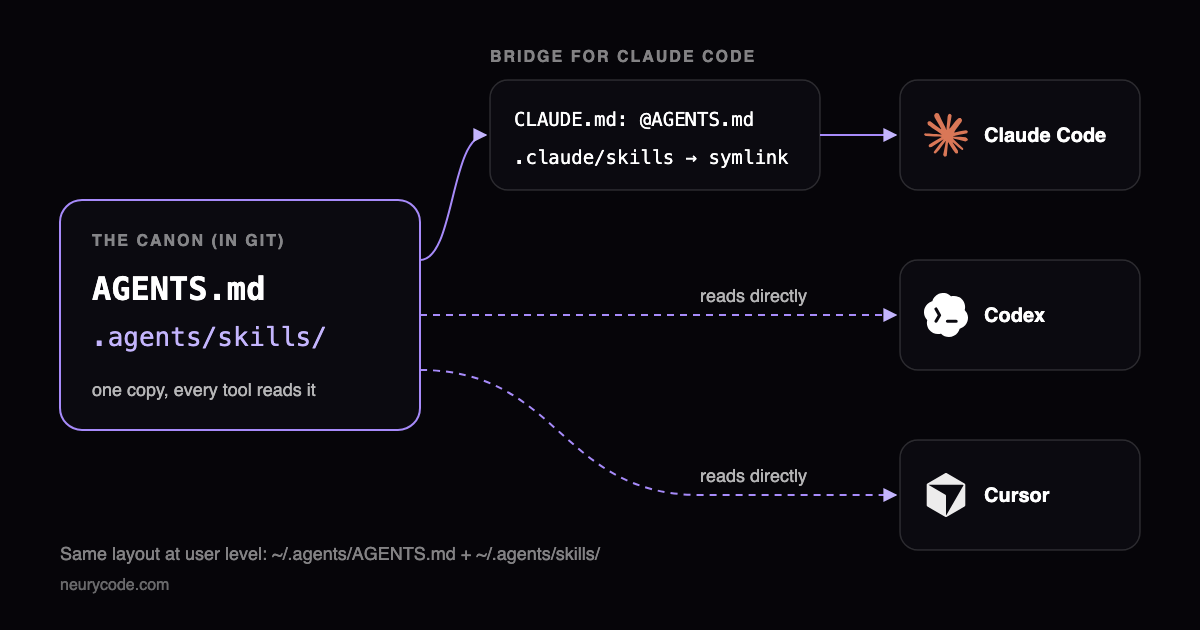 Diagram: the canon (AGENTS.md and .agents/skills) is read directly by Codex and Cursor, and by Claude Code through a CLAUDE.md import and a .claude/skills symlink
In a repo, it looks like this:
repo/
  AGENTS.md                          ← the canon: all shared instructions
  CLAUDE.md                          ← one line: @AGENTS.md
  .agents/skills/<skill>/SKILL.md    ← all skills
  .claude/skills -> ../.agents/skills   (symlink)
Why AGENTS.md and not CLAUDE.md? Because AGENTS.md is an open format that many tools read. CLAUDE.md is read only by Claude Code, plus Cursor for compatibility. Codex reads AGENTS.md and .agents/skills/ without any extra setup. Cursor does too. Only Claude Code needs a bridge.
Here are the five steps.
Step 1: Make AGENTS.md the canon in every repo
Move all shared instructions into AGENTS.md: conventions, architecture, docs rules, git rules. If you have both CLAUDE.md and AGENTS.md, merge them by hand or with an agent. Do not keep two copies.
One rule I learned from testing: keep critical rules inside AGENTS.md itself.
Claude Code supports @path imports: it expands the file into the context at start. Cursor and Codex do not. I tested the Cursor CLI with a marker in an imported file. Cursor saw the line @docs/extra.md as plain text and never saw the marker. Codex also treats it as text and opens the file only if it decides to.
So use separate docs only for long reference material. In AGENTS.md, say in plain words when to read them: "Before you change the database schema, read .agents/docs/database.md."
Step 2: Keep CLAUDE.md as one line: @AGENTS.md
This is the "AGENTS.md vs CLAUDE.md" answer: you need both files, but only one holds content. Your whole CLAUDE.md is this one line:
@AGENTS.mdSince v2.1.277, Claude Code reads AGENTS.md on its own, but only when there is no CLAUDE.md or CLAUDE.local.md in your folder or above it. So why keep CLAUDE.md at all? Three reasons:
- Some sessions do not read
AGENTS.mddirectly: older versions, the first session after an upgrade, or a disabled built-in plugin. The import works everywhere. - If anyone adds a
CLAUDE.local.md, Claude Code stops readingAGENTS.md. The import keeps working. - It gives you a place for Claude-only notes, under the import line.
The docs confirm that the import never makes Claude read AGENTS.md twice.
What about Cursor? Many articles say Cursor ignores CLAUDE.md. That is out of date. The Cursor CLI docs say it reads both AGENTS.md and CLAUDE.md at the project root. My test confirmed it. A one-line CLAUDE.md costs Cursor nothing, because it loads AGENTS.md anyway.
Step 3: Put skills in .agents/skills and link them for Claude Code
Codex and Cursor read .agents/skills/ directly. Claude Code reads only .claude/skills/. One symlink fixes that:
mkdir -p .claude
ln -s ../.agents/skills .claude/skills
Keep .claude/settings.json and other Claude files where they are. Only the skills folder becomes a link.
My worry here was Cursor. It reads skills from .agents/skills/ and from .claude/skills/ for compatibility. Would it show every skill twice?
I tested it with the Cursor CLI. The answer is no. A skill reached through a symlink appears once. Duplicates come from copies. On my machine, Cursor showed skill-creator twice. I had two separate copies of it: one from the Claude app and one from a Claude Code plugin.
That is one more reason to keep one canon and link to it.
Step 4: Do the same at user level
Your personal rules and skills need the same layout. This is my home folder now:
~/.agents/
  AGENTS.md            ← canon of my global instructions
  skills -> ~/.claude/skills    (symlink: one folder, two names)
~/.claude/CLAUDE.md    ← @~/.agents/AGENTS.md
~/.codex/AGENTS.md     -> ~/.agents/AGENTS.md   (symlink)
Set it up once. First, merge your old global files (~/.claude/CLAUDE.md, ~/.codex/AGENTS.md) into ~/.agents/AGENTS.md. If ~/.agents/skills already exists, move its skills to ~/.claude/skills. Then run:
mkdir -p ~/.agents ~/.claude/skills ~/.codex

# Point the tools to the canon
echo '@~/.agents/AGENTS.md' > ~/.claude/CLAUDE.md
ln -sf ~/.agents/AGENTS.md ~/.codex/AGENTS.md

# One skills folder, two names
ln -s ~/.claude/skills ~/.agents/skills
Why does the link point this way? Claude Code reads personal skills only from ~/.claude/skills/, and there is no setting to add another folder. The Claude app also writes its synced skills there. So the real folder stays where Claude expects it, and ~/.agents/skills is just a second name for it.
Now you add a new skill to ~/.agents/skills/<name>/, and all three agents see it right away. No script, nothing to remember. I tested it with a temporary skill: Claude Code, Codex and the Cursor CLI each showed it once.
One trade-off: Codex searches skill folders recursively, so it now sees the Claude app's synced skills too. Cursor saw them before anyway (more on that below). A few of these skills only work in Claude.
Cursor has no global instructions file. Global instructions live in User Rules in the settings. My test confirmed that Cursor does not read ~/.claude/CLAUDE.md or ~/.agents/AGENTS.md. So paste your global AGENTS.md into User Rules once.
One more thing I found: Cursor loads every skill it finds in ~/.claude/skills/, including the Claude app's synced skills. On my machine, Cursor saw 32 skills. 14 of them came from the Claude app, and some of those, like computer use, do not work in Cursor at all. Cursor puts skill descriptions into the context at the start of a chat, so this costs tokens. In the IDE, you can turn this off with the "Include Third-Party Plugins, Skills, and Other Configs" toggle. In the CLI, you cannot.
Step 5: Migrate all repos with one prompt
I did not move 22 repos by hand. I gave the job to Codex with the prompt below. The most important part is two phases: first a read-only inventory, then my review, then the changes.
The review step saved me twice.
- In one repo, a Cursor rule allowed resetting the database, while
CLAUDE.mdsaid "never reset it". Codex found the conflict, and we kept the stricter rule. - My first prompt said "if two files conflict, keep the newer wording". In the repo where the two copies had drifted apart, the newer wording was the wrong one. That rule would have kept the mistake. Now the prompt asks the agent to list conflicts, not to solve them.
Cursor rules need a mapping, because Cursor has four rule types and the canon has two places:
| Cursor | Goes to |
|---|---|
Rule with "Always Apply" (and old .cursorrules) | A section in AGENTS.md. Long reference text → .agents/docs/, with a sentence in AGENTS.md that says when to read it |
| Rule that applies intelligently, to specific files, or manually | A skill in .agents/skills/ |
Custom command (.cursor/commands/*.md) | A skill in .agents/skills/ |
To be fair: Cursor rules still work. Moving them is my choice, not Cursor's requirement. And there is a trade-off. A rule for *.ts files attaches itself to every TypeScript file. As a skill, it loads only when the agent decides it is relevant. For me, one setup for every tool is worth it.
Here is the prompt. Replace the folder and the list of repos to skip:
You are migrating my repositories to one agent-agnostic setup.
Canon: AGENTS.md for instructions, .agents/skills/ for skills.
Every tool-specific file must point to the canon, never hold its own copy.

Repos: every git repo directly inside <your repos folder>, except: <repos to skip>.
Skip repos that have none of: AGENTS.md, CLAUDE.md, .claude/, .cursor/, .cursorrules, .agents/.
Do not create instructions for repos that have none. A generic AGENTS.md is worse than no file.

Phase 1 — Inventory (read-only). For each repo, show a table:
repo | instruction files | skills folders | Cursor rules/commands | uncommitted changes (yes/no).
Point out duplicates and files that have drifted apart (same purpose, different content).
Then STOP and wait for my "go".

Phase 2 — Migrate, one repo at a time. Only touch agent config files. Never touch my other uncommitted work.

1. Instructions → AGENTS.md
   - If only CLAUDE.md exists: move its content to AGENTS.md.
   - If both exist: merge them into AGENTS.md. If they conflict, do not choose.
     Keep both versions, mark the conflict, and list it in the report for me to decide.
   - Cursor rules with alwaysApply: true and .cursorrules: merge into AGENTS.md, one section per rule.
     If a rule is long (50+ lines), move it to .agents/docs/<name>.md and add one sentence
     to AGENTS.md that says when to read it.
   - Keep the original wording. Do not rewrite, shorten or "improve" instructions.
2. CLAUDE.md → one line: @AGENTS.md
   (Claude Code imports it. Claude-only notes can go below the import.)
3. Skills → .agents/skills/<name>/SKILL.md
   - Move real skill folders from .claude/skills/ and .cursor/skills/ into .agents/skills/.
   - Every Cursor rule that is not alwaysApply: true (with a description, with globs, or manual),
     and every .cursor/commands/*.md: convert each into a skill
     (SKILL.md with name + description frontmatter, original text as the body).
     For a glob rule, the description says when to use it, for example "Use whenever you create or edit *.ts files".
   - Then make .claude/skills a symlink: ln -s ../.agents/skills .claude/skills
     (replace per-skill symlinks or copies; keep .claude/settings*.json and other files in .claude/).
4. Delete the migrated .cursor/rules/*.mdc, .cursor/commands/*.md and .cursorrules. Git keeps the history.
   Keep any other files in .cursor/ (for example a memory bank) and mention them in the report.
5. Do not commit. Do not push.

Phase 3 — Report. For each repo: what moved where, what was merged, conflicts, what was left as is.
Then give me the commands to check it: git -C <repo> status and git -C <repo> diff --stat.
Make a backup of your agent config files before Phase 2. I archived them into one .tgz file. Then commit only the agent config paths, so your other work stays untouched.
How to check it after your next switch
With this setup, the only thing to do after you move to a new tool is a quick test on a couple of random repos.
If your repos already have skills, it is one question. Open the new agent in a repo and ask:
Without reading any files, list every skill you can see and the file it comes from.
Then quote the first line of your project instructions.
If you see your skills once each, and your AGENTS.md, you are done.
If you have no skills yet, add a test marker first. Put a line like Marker: CANON-TEST-1 into AGENTS.md, and create a temporary skill in .agents/skills/setup-check/. Ask the agent which markers and skills it sees. Then delete both.
What does not move between agents
Here is the part I promised at the start. Instructions and skills move. Tool settings do not.
Hooks, MCP server configs, permissions, model choice and plugins are different in every tool. Each has its own file format and its own features. For example, Claude Code Mods only exist in Claude Code. Cursor's global User Rules live in the settings, not in a file.
So keep a short list of these settings for each tool. When you switch, you set them up by hand. It takes minutes, because the big part, your prompt ecosystem, is already in place.
FAQ
Does Claude Code read AGENTS.md?
Yes, since v2.1.277. But only when there is no CLAUDE.md, .claude/CLAUDE.md or CLAUDE.local.md in your folder or above it. A CLAUDE.md with @AGENTS.md works in every case. (Docs)
Should I delete CLAUDE.md?
The docs allow it if it only holds the import. I keep it, because some sessions cannot read AGENTS.md directly, and a CLAUDE.local.md would turn AGENTS.md off.
Does Cursor read CLAUDE.md?
Yes. The Cursor CLI reads AGENTS.md and CLAUDE.md at the project root. The IDE reads CLAUDE.md and .claude/skills/ when the third-party configs toggle is on. (Docs)
Can I symlink CLAUDE.md to AGENTS.md instead?
It works, and Claude Code supports it. But the docs list constraints for symlinks, and a symlink leaves no room for Claude-only notes. The one-line import is simpler.
One setup, and the next switch is cheap
The AI coding market changes fast. The leading tool changes every year, so it makes no sense to lock your work into one of them. I wrote more about how I moved between tools in my Cursor vs Codex vs Claude Code review.
Your prompt ecosystem is the part worth keeping. Put it in one canon: AGENTS.md and .agents/skills/. Add a one-line CLAUDE.md and a symlink for Claude Code. Do the same in your home folder. Then the next switch is a 2-minute test, not a new migration.
Get the checklist: the file layout, the commands, the Cursor mapping table, the test and the migration prompt on one page. Download the Agent-Agnostic Setup Checklist (PDF)
Running a software company or leading an engineering team?
Take the free automated AI Adoption Healthcheck: 3 minutes, and you get your company's AI adoption score with next steps.