Jev Use Cases: 12 Ways to Use Jev AI for Coding and Beyond
12 Jev use cases with diagrams: Claude Code skill routing, Jev code review, browser agents, app testing, AI lint checks, fraud and lead scoring.
For $1.19, Jev can read 28 million tokens of a codebase and flag every function that looks like a code smell. For about one cent, it can grade 150 code comments in under ten seconds. Neither job needs an LLM to write a single word.
That is the practical promise behind Jev, the decision model from TypeSafe AI. If you are new to it, start with our Jev AI explainer. In short, Jev reads a state, answers questions you define and returns probabilities. It does not generate text.
This post covers the next question: what do you actually build with it? I went through Ray Amjad's deep dive on Jev and Claude Code, traced every demo back to its original source and turned them into 12 Jev use cases. Each one comes with a diagram. Most are about coding agents, and three are about ordinary business workflows.
 Jev use cases for coding agents: code review, app testing, lint checks and skill routing
How every Jev use case works
Every example below follows the same pattern. You give Jev a state: an invoice, a diff, a log line or a web page. Then you ask it one or more questions in one of three shapes:
- Noul for yes-or-no questions. It returns the probability that a statement is true.
- Score when answers sit on a spectrum you define. Ray's demo notes that a rubric can have up to 11 anchors.
- Choice for anything else: named options, up to 255 of them, each with its own probability.
Your code then applies a threshold. That is the whole architecture. The model judges, and the code enforces.
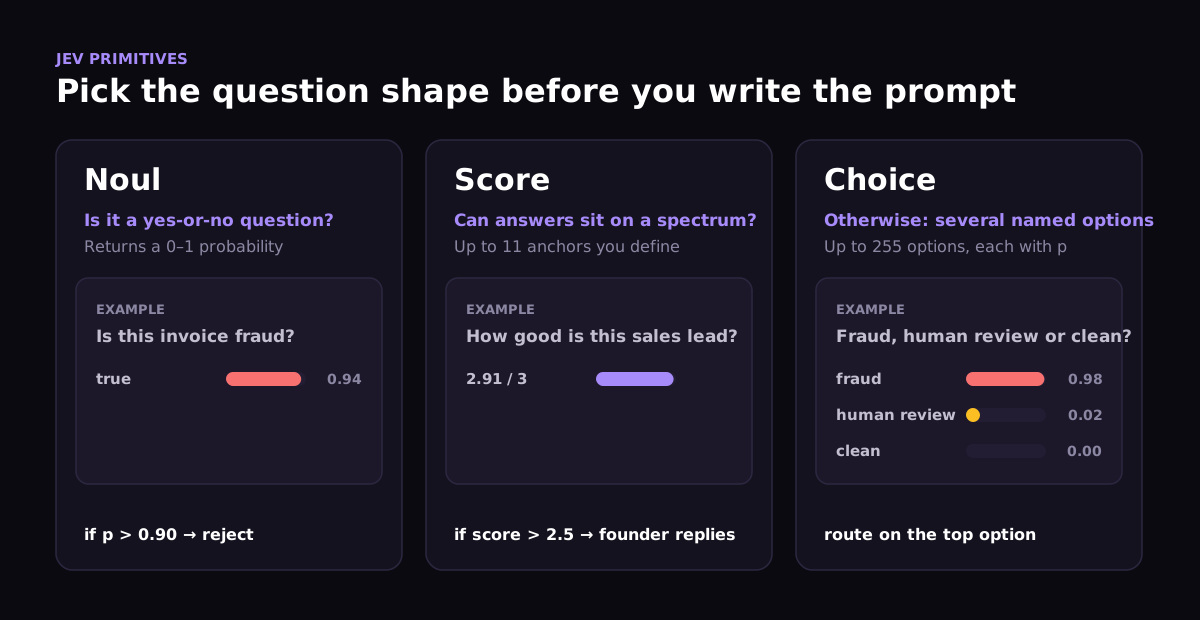 Jev question shapes: Noul for yes-or-no, Score for a spectrum, Choice for named options
The latency is what makes the use cases possible. In Ray's playground demo, answers came back in about 100 milliseconds and stayed within 2–3 percentage points across repeated runs. At the published price of $0.042 per million input tokens, with output free, you can afford to ask a question almost anywhere.
System 1 and System 2 AI agents
TypeSafe calls Jev a System One model, a reference to Daniel Kahneman's Thinking, Fast and Slow. System 1 is fast and reflexive. System 2 is slow and deliberate. Kahneman's key point is that practice moves skills from System 2 into System 1: a new driver checks every mirror, and an experienced one does not.
The same split works for agents. Claude, GPT or Gemini acts as System 2. It sets the goal, reads the log of Jev's decisions and outcomes, and rewrites Jev's criteria, examples and thresholds. Jev acts as System 1 and makes hundreds of small decisions in real time.
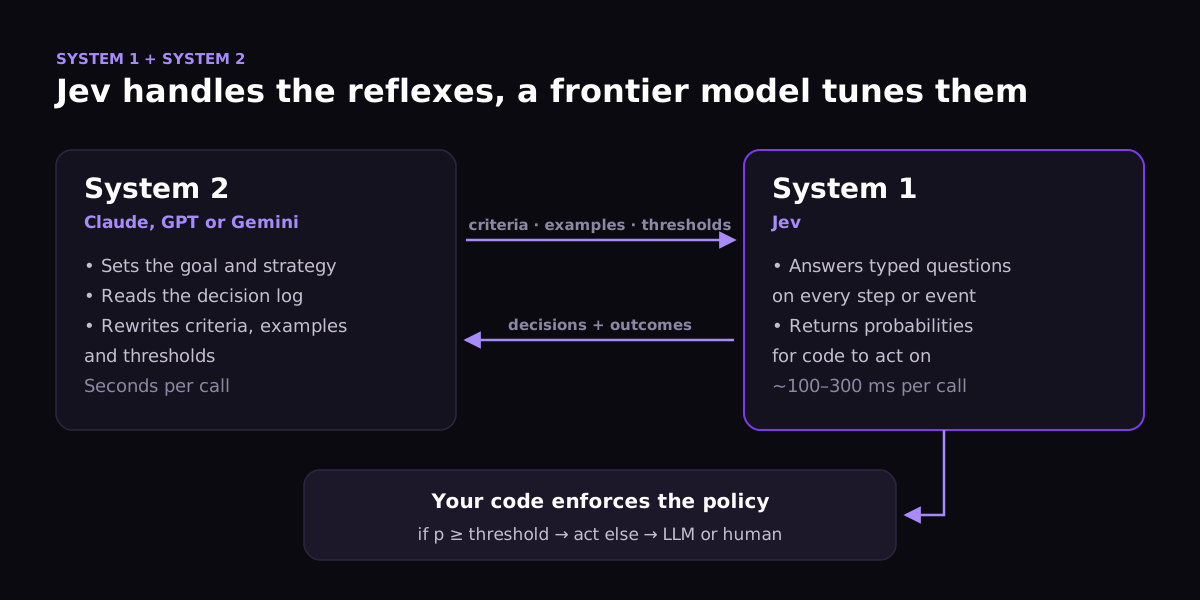 System 1 and System 2 AI agents: Jev decides quickly, a frontier model reviews the decisions and tunes the criteria
Ray tested this split in Minecraft. A GPT model planned the strategy ("build a shelter before nightfall, then mine"). A Codex reviewer checked progress every two minutes and after every setback. Jev picked the next task from a fixed list at every step, using health, hunger, time of day and recent history as the state. Over the course of the video, the agent built a house, hid underground overnight to avoid monsters and crafted a diamond pickaxe.
A game is not production software. It does show that a sub-second decision model can sit inside a control loop where a multi-second LLM would stall.
Jev AI for coding: Claude Code use cases
The coding use cases are the most interesting part of the video, and they all build on one idea: give your agent a good feedback loop. Jev makes that feedback loop cheap enough to run at every step.
TypeSafe publishes an agent skill for Claude Code and Codex, so you can ask your coding agent to write the Jev integration for you. That is how Ray built most of his demos.
1. Claude Code skill routing: fix skills context bloat
People who install dozens of Claude Code skills eventually hit the same problem: Claude Code has too many skills. Every skill description sits in the context window on every turn. With 100 or 200 skills, that is thousands of tokens the agent rarely needs, plus more chances to pick the wrong skill.
Jev can act as a router. TypeSafe's skill suggestion cookbook makes two calls. The first ranks all 182 skills of a Hermes agent with one Choice question. The second reranks the top three using the opening of each SKILL.md. Only the winner is loaded into the agent's context.
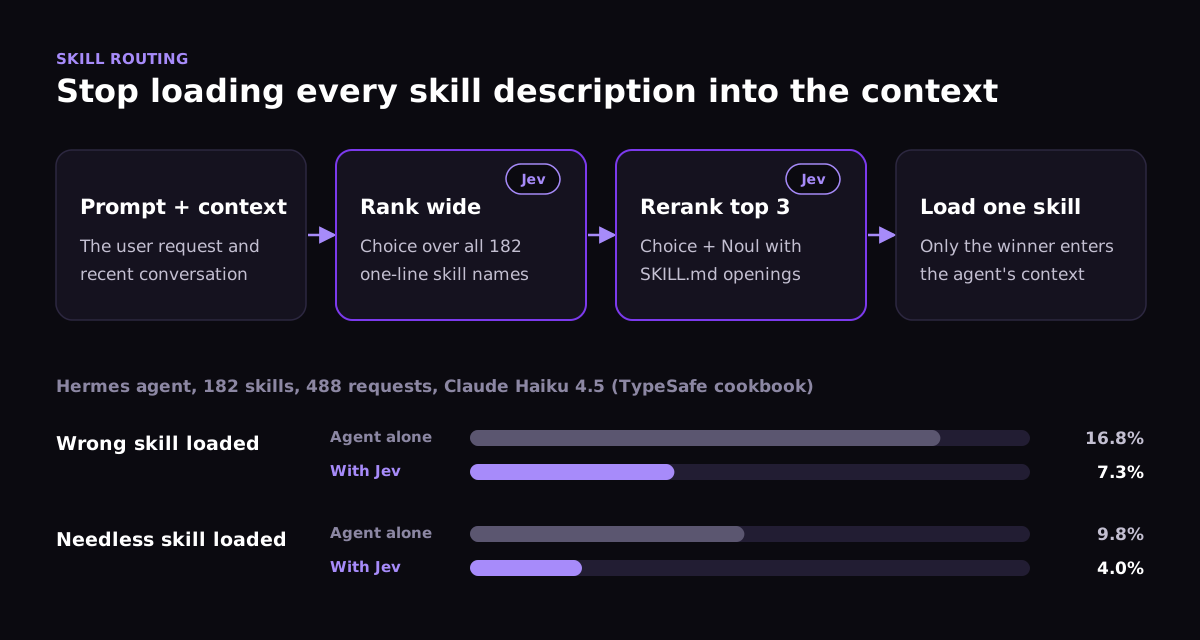 Claude Code skill routing with Jev: rank 182 skills, rerank the top 3 and load only one; wrong loads fall from 16.8% to 7.3%
Across 488 requests with Claude Haiku 4.5, wrong skill loads fell from 16.8% to 7.3%, and needless loads fell from 9.8% to 4.0%. Ray estimates that moving his own skills behind a router would free about 10,000 tokens of context. If you have built your own Claude Code Mods and skills, this is the cheapest way to keep adding them without paying for it on every turn.
2. Coding agent feedback loop: verify every diff
When a coding agent finishes a task, you usually want answers to a few narrow questions before a human sees the change. Did it do what was asked? Did it quietly weaken a test? How strong is the verification? What is the riskiest area it touched?
Jev can answer all four in one request, with the task and the diff as the state. If the diff "passes" by skipping a failing test, the Noul question about weakened tests catches it, and your code sends the diff back to the agent before the pull request is opened.
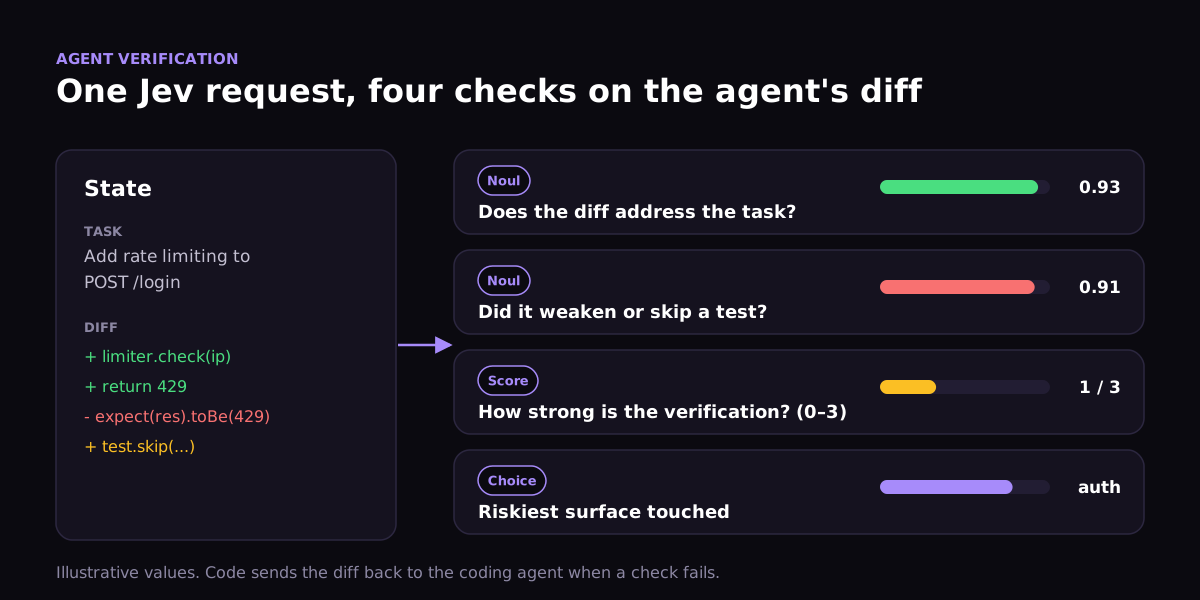 Coding agent feedback loop: one Jev request checks whether a diff addresses the task, weakens a test, is well verified and touches a risky surface
3. Jev browser agent: check the feature in a real browser
A diff check reads code. A browser check proves the feature works. Browser Use released an open-source browser agent in which Jev picks each next action from the page's DOM, and a small LLM steps in only to type text. Its Google Flights search took 7 seconds and cost $0.0039.
For a coding workflow, that changes where verification can live. Opus or Fable builds a feature. A Jev browser agent clicks through the affected user flows in seconds and reports what broke. The main agent fixes it. If the browser agent's options turn out too coarse, the main agent can rewrite its questions. This is System 2 training System 1 again.
4. AI app testing: parallel Jev app testing on every release
Once a browser session costs a fraction of a cent, you can run many of them at once. Rafal Wilinski, a founding engineer at Runlayer, described a massively parallel, browser-based adversarial testing suite built on Jev. It tries to break each release, and it "costs pennies."
Ray estimates that thousands of browser sessions per day would cost him around $5–10 in tokens. At that point, as he puts it, the bottleneck is your compute rather than your tokens. Jev app testing does not replace deterministic end-to-end tests. It adds a layer of "does anything here look wrong?" exploration that used to be too slow and expensive to run on every pull request.
5. Code comment audit
Mark Jaquith's comment-scoring demo scores every comment on two separate axes: accuracy and usefulness. // Multiply the value by two. above return value * 2 is perfectly accurate and completely useless.
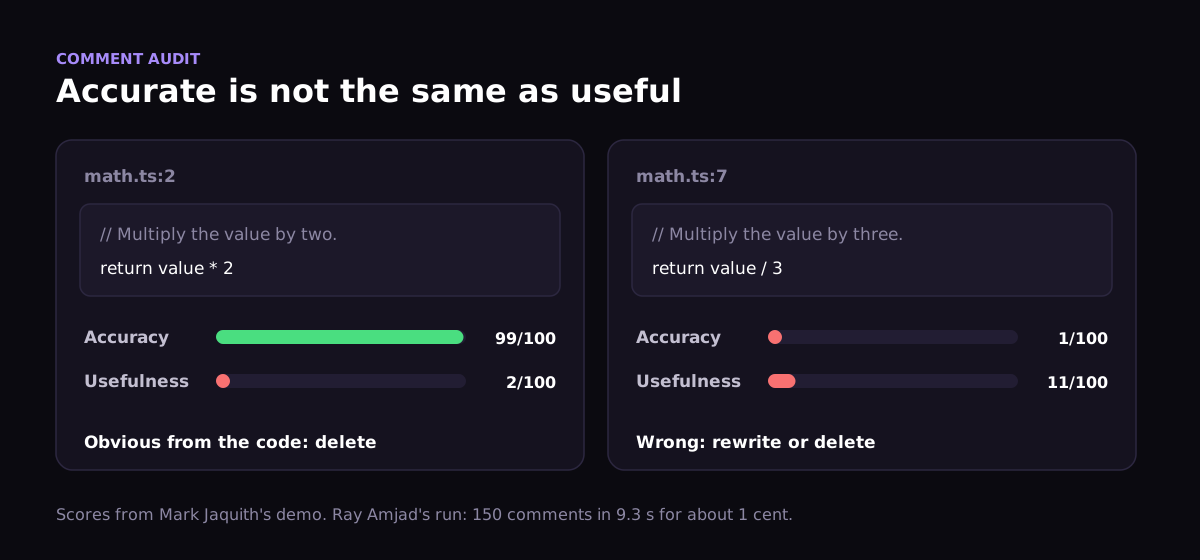 Jev scores code comments on accuracy and usefulness: an obvious comment scores 99 for accuracy and 2 for usefulness
Ray pointed Claude Code at a project full of comments written by older models. Claude proposed the criteria and ran Jev on a sample: 150 comments in 9.3 seconds for about one cent. It estimated that the whole codebase would cost about 57 cents and produce a shortlist of roughly 1,700 comments worth rewriting. The plan then hands only the flagged comments to cheaper Haiku sub-agents for rewriting.
6. AI lint check: lint rules written as questions
Traditional linters are good at syntax and bad at meaning. A rule like "don't log payment data" needs a lot of brittle pattern matching. Victor Mota sketched a different approach: write each lint rule as a question, attach thresholds and let Jev answer it for every matching node.
call("log|info|warn|error|debug")`What kind of value is being logged?`
  .oneOf("clean", "pii", "secret", "financial")
  .error("secret", "financial", 0.80)
  .warn("pii", 0.70)
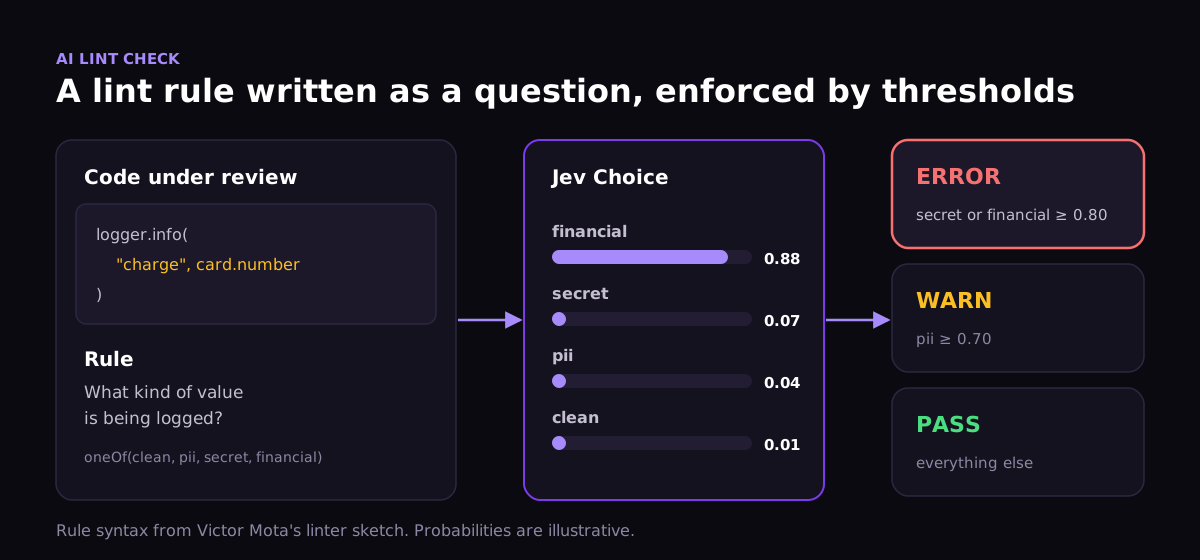 AI lint check: Jev classifies a logged value as financial with 0.88 probability, which crosses the error threshold
Other rules from the same sketch include "Does the name describe everything this function does, including side effects?" and "Is this comment still accurate given the code that follows it?" Neither is expressible as a regex. Both are cheap enough to check on every pull request.
7. AI code smell detection across the whole codebase
Code smells, as Martin Fowler catalogued them in Refactoring, split into two kinds. Mechanical smells such as duplicate code, dead code and magic numbers are better handled by static analysis. Semantic ones, such as a function that does more than its name says, need judgment.
Ray asked Claude Code to plan a smell scan with Jev. Claude assigned the mechanical smells to static tools and wrote Jev questions for the rest. It estimated an exhaustive pass at 28 million input tokens, or $1.19. The flags above the threshold then go to Claude or Codex for confirmation and refactoring.
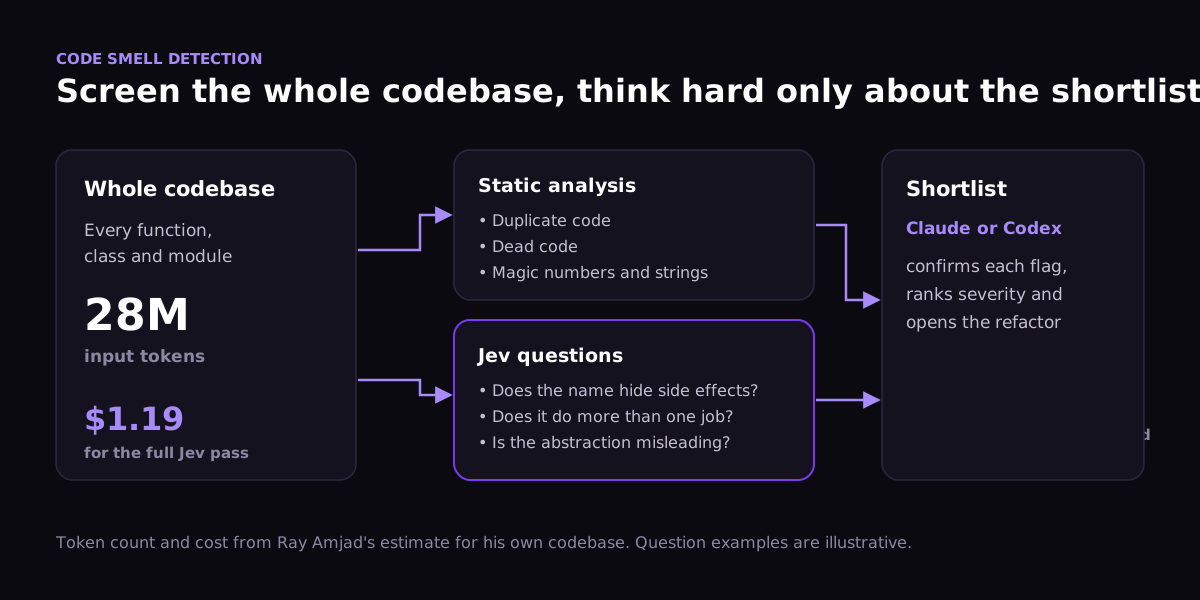 AI code smell detection: static analysis handles mechanical smells, Jev screens semantic ones, and Claude reviews only the shortlist
Jev will not catch every smell. It judges one piece of code at a time, so smells that span many files are harder. The pattern still generalizes. Any invariant you care about, from naming conventions to potential security issues, can become a cheap question asked across the whole codebase.
8. Jev code review
Code review is where the pieces come together. Dev Agrawal's open-source jev-review runs a diff or a whole codebase through staged Jev judgments: a risk matrix across correctness, security, reliability, compatibility and tests; per-file profiles; evidence selection; failure-mechanism classification; severity scoring; and finally routing to a reviewer. Thresholds and workflow policy stay in code.
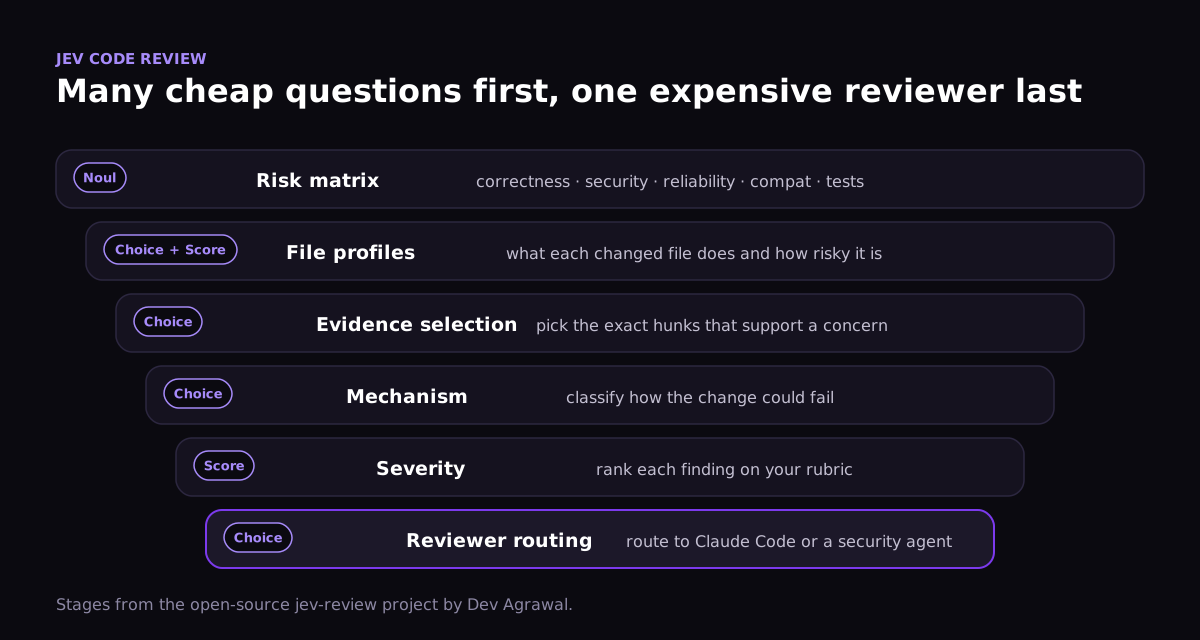 Jev code review pipeline: staged Jev questions narrow a diff down before an expensive coding agent reviews it
Ray asked his Opus-based agent to estimate the savings. Its answer: a Jev pre-screen cannot replace Claude Code's built-in review, but it could cut the code the reviewer has to read by about ten times. That is an estimate, not a measurement. Still, it lines up with the argument in our post on optimizing AI coding cost per task: the cheapest tokens are the ones the expensive model never reads.
Ray's longer-term idea is to give a coding agent codebase reflexes: a checklist of 50, 100 or 500 project-specific questions that runs on every pull request, the way a senior engineer's intuition does. Anything that scores high goes to the main agent or a specialist.
9. Security pipelines
The strongest external data point comes from Greg Pstrucha, who works on AI at Sentry. He shared results from swapping Jev into one of Sentry's security pipelines. The team was already using small models to keep costs down. Jev matched the best accuracy in the comparison at a fraction of the cost and latency.
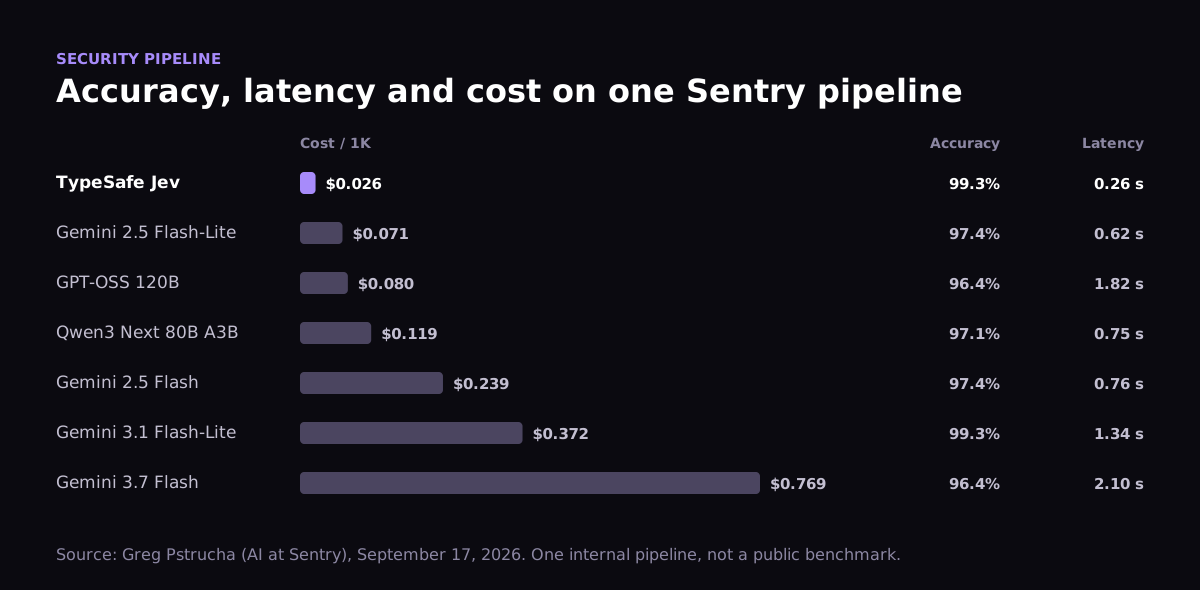 Sentry security pipeline: Jev reached 99.3% accuracy at 0.26 seconds and $0.026 per 1K, cheaper and faster than GPT-OSS 120B and Gemini Flash models
It is one internal pipeline, not a public benchmark. In Pstrucha's words, though, it is "the first one that actually impressed me."
Jev AI examples beyond code
The same three question shapes work for any narrow, repeated decision. Ray's playground demos show three that most businesses will recognize.
10. AI invoice fraud detection
Give Jev an invoice and a list of fraud signals, then ask a Choice question: fraud, human review or clean. On a made-up suspicious invoice, it returned 98% fraud and 2% human review in under 100 milliseconds. Your code blocks payment above 0.90 and sends the ambiguous cases to the accounts payable team.
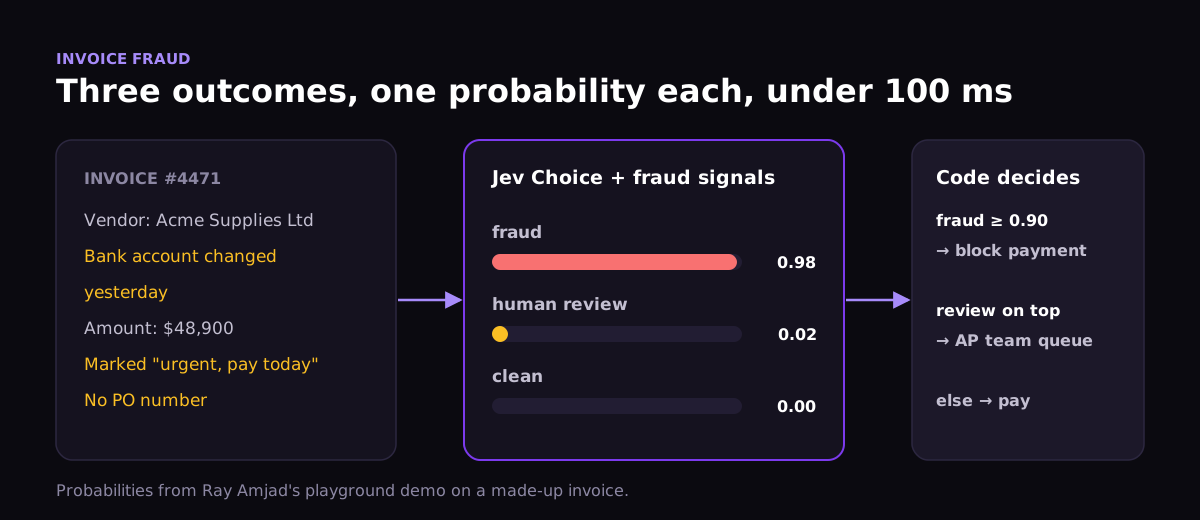 AI invoice fraud detection: Jev returns fraud 0.98, human review 0.02 and clean 0.00, and code blocks the payment
Adding the fraud signals to the question moved a plain Noul answer from 85% to 94%. Your definition of "true" is part of the prompt, and it changes the result.
11. AI lead scoring with Jev
Lead quality is a spectrum, so it fits a Score question. Ray's rubric runs from 0 (a hobbyist with no budget) to 3 (an enterprise buyer). A large inbound lead scored 2.91. The reply policy stays in code: above 2.5 the founder replies the same day, between 1.5 and 2.5 a sales rep replies that week, and below that the lead gets an automated reply.
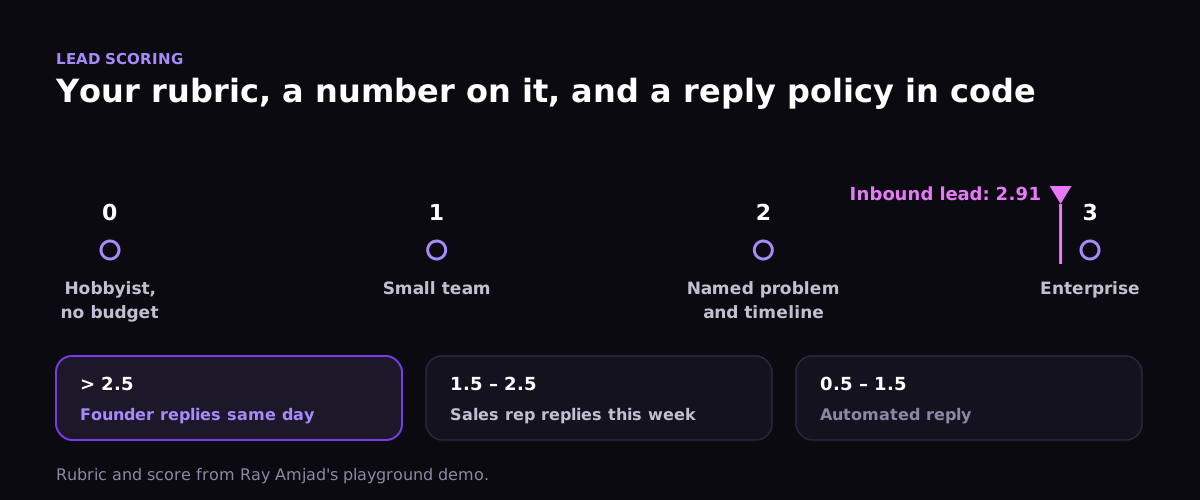 AI lead scoring with Jev: an inbound lead scores 2.91 on a 0 to 3 rubric and is routed to the founder
12. AI log triage
The same Score shape works for on-call alerts. Rate each log line from 0 (routine) to 3 (outage), and page an engineer only above 2.5. In Ray's demo, an exhausted connection pool scored 2.99. Because each call is cheap and fast, you can score a critical system's logs almost in real time instead of relying on hand-written alert rules.
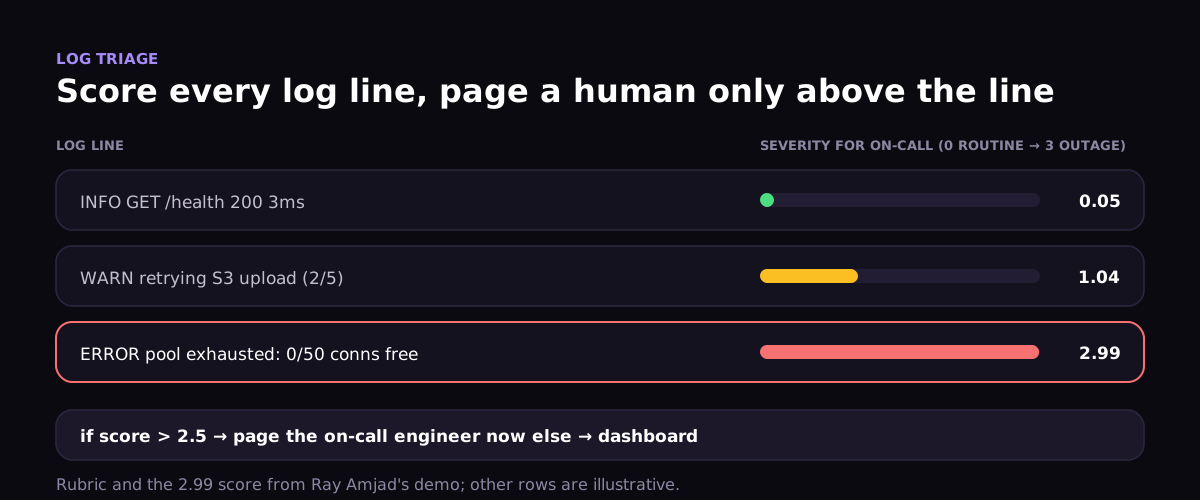 AI log triage: Jev scores log lines for on-call severity and pages an engineer only when the score is above 2.5
What these Jev use cases have in common
The patterns repeat across all twelve:
- The answer space already exists. Skills, test outcomes, lint severities and fraud labels are all finite lists. Jev works best when you can write the options down.
- Code owns the policy. Every example ends in an
ifstatement with a threshold, not in the model's judgment alone. - Uncertain cases fall back. Low-confidence answers go to an LLM or a person. Jev narrows the work instead of replacing the reviewer.
- System 2 tunes System 1. The best results come from letting a frontier model read Jev's decisions and rewrite its questions over time.
Keep the caveats in mind. Most numbers here come from launch-week demos, vendor documentation and single-team reports. Jev can still choose the wrong valid option, so every production use needs an evaluation set and a fallback path.
Conclusion
The most useful way to think about Jev is not as a cheaper LLM. It is a way to add judgment to the places where you would never have paid for an LLM call: every agent step, every comment, every log line, every pull request.
For developers, the starting point is simple. Install the TypeSafe skill in Claude Code or Codex, pick one narrow question your agent currently gets wrong, such as which skill to load or whether a test was weakened, and let Jev answer it. Measure the error rate before and after. If it holds up, add the next question.
Running a software company or leading an engineering team?
Take the free automated AI Adoption Healthcheck: 3 minutes, and you get your company's AI adoption score with next steps.